













Grounding agentic AI with the Collibra MCP for Databricks
Share on:



Over the last few years, Databricks has grown from a managed Apache Spark platform into an end-to-end data and AI platform that serves technical and non-technical professionals alike. Its governance layer. Unity Catalog (UC), has made tremendous strides since going Generally Available in 2022, and handles the technical side of governance well, including access controls, lineage, and drift detection. What UC doesn’t set out to cover is the business side of governance: the shared definitions, data products, data contracts and self-service marketplace that lets an entire organization trust and consume data with confidence. That’s the layer Collibra provides.
The 2026 Databricks Governance Partner of the Year, Collibra is the enterprise AI control plane governing context and ensuring control across every source, model and agent. Alongside the technical governance UC already delivers, Because the two platforms are complementary — Databricks as the data and AI engine, Collibra as the governance and business layer — many organizations run them together. Both companies have invested in making that pairing seamless, most recently through the Collibra MCP server for Databricks.
As teams move from AI experimentation to production, agents like Genie and Agent Bricks are only as trustworthy as the context behind them. Point an agent at raw data with no governed definitions and it will guess; ground it in Collibra and every answer traces back to a definition the whole business agrees on. The Collibra MCP server makes that governed context available directly inside Databricks — with no context switching.
This post walks through three real-world use cases for the Collibra MCP server from within Databricks: grounding Genie answers in the Collibra business glossary, validating data contracts, and creating governed assets in Collibra without leaving Databricks.
Setup and configuration
Setting up the Collibra MCP server inside Databricks is straightforward, and assuming you have the right permissions, should take no more than ten minutes. Our product documentation will walk you through the steps.
Throughout this blog, we will use Databricks’ Playground, which is ideal for testing AI models against any number of tools, including the Collibra MCP server.
While Playground is great for testing and configuration, it isn’t where you’d run production. For production use cases, you could leverage additional options like an Agent Supervisor, which puts a custom agent behind an API URL, experiment tracking, tracing and more.
Use case one: Grounding Databricks AI/BI Genie and Collibra Business Glossary
Databricks Genie Agents (formerly known as Genie Spaces) has made the platform accessible to business users, not just technical ones. Genie lets people ask questions and receive answers in natural language. Under the hood, Genie uses an LLM to convert the question into SQL, runs the SQL code on a SQL warehouse against the data in the Genie Agent, and returns the answer either in table form, visualization form or a text-based answer — and all of is mostly invisible to the end user. Genie performs well out of the box, and it works even better when you provide a Genie Agent instructions, either in the Genie Agent itself or on the underlying table and column comments.
Adding instructions to individual Genie Agents works well in small scale environments, like development or testing. At enterprise scale, however — where many Genie Agents query many data sets — manually adding instructions and text to every Genie Agent creates real challenges. The most obvious is drift: keeping every space on the same definition for every metric, and keeping those definitions aligned with the tools and processes that live outside of Genie entirely. These are data governance issues, not Genie issues.
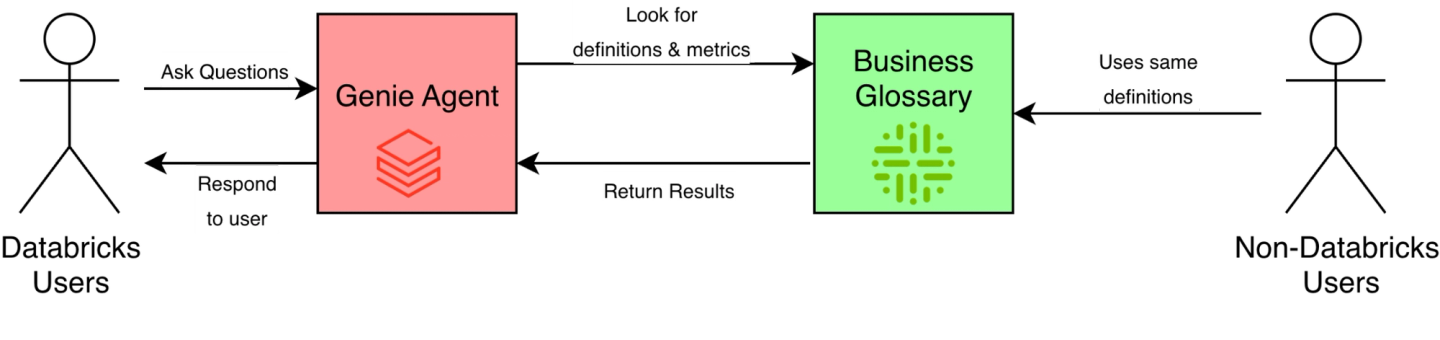
The scalable solution is to store key metrics and definitions once, in the Collibra Business Glossary, and have Genie query those definitions and terms from inside of Collibra. This keeps every Genie Agent on the same definitions, and it keeps every other consumer (human or agent) on the same definitions, regardless of where the analytics takes place.
A visual representation of what this looks like can be found in the image below:
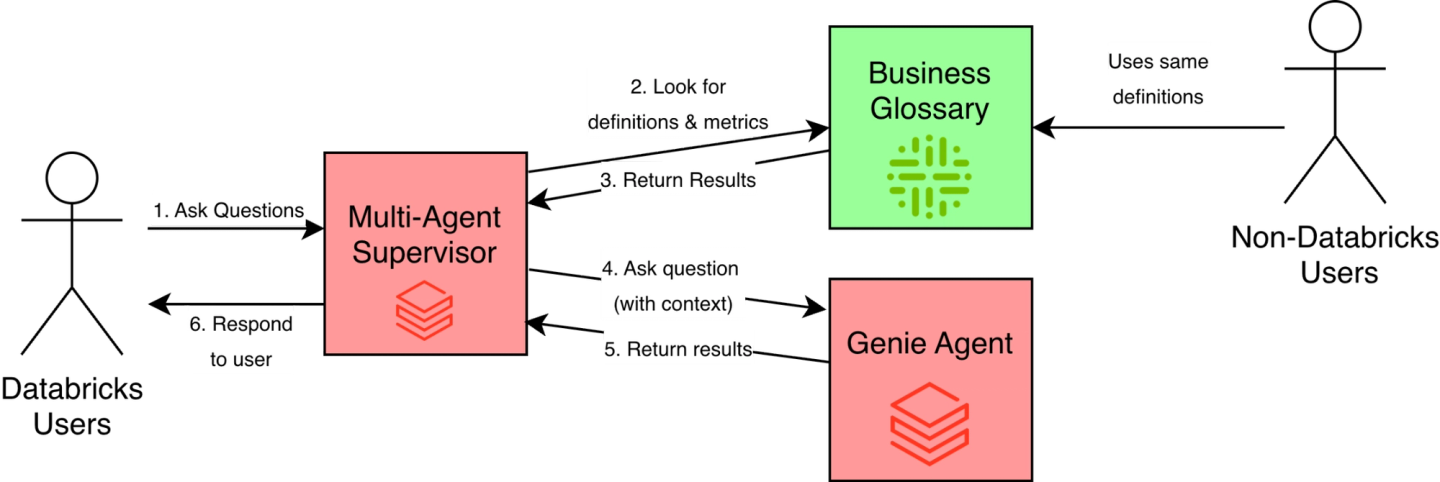
One constraint: You can’t connect a Genie Agent directly to an external system. To bridge that gap, we use the Agent Supervisor in Agent Bricks, which connects our Genie Agent with our Collibra business glossary. The new flow looks like the following diagram:
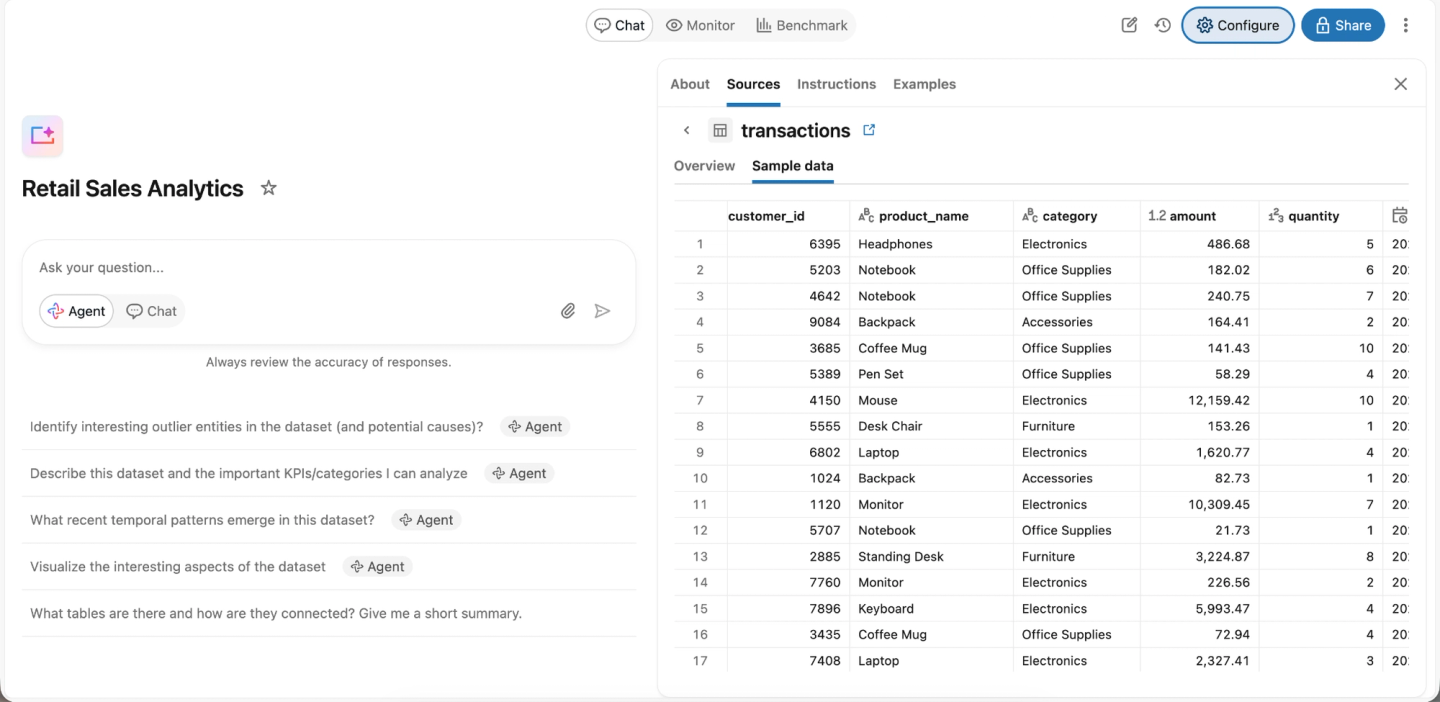
For the rest of this use case, assume you already have a Genie Agent already created alongside the Collibra MCP Server. We’re using a basic Genie Agent that contains fictional retail transaction data.
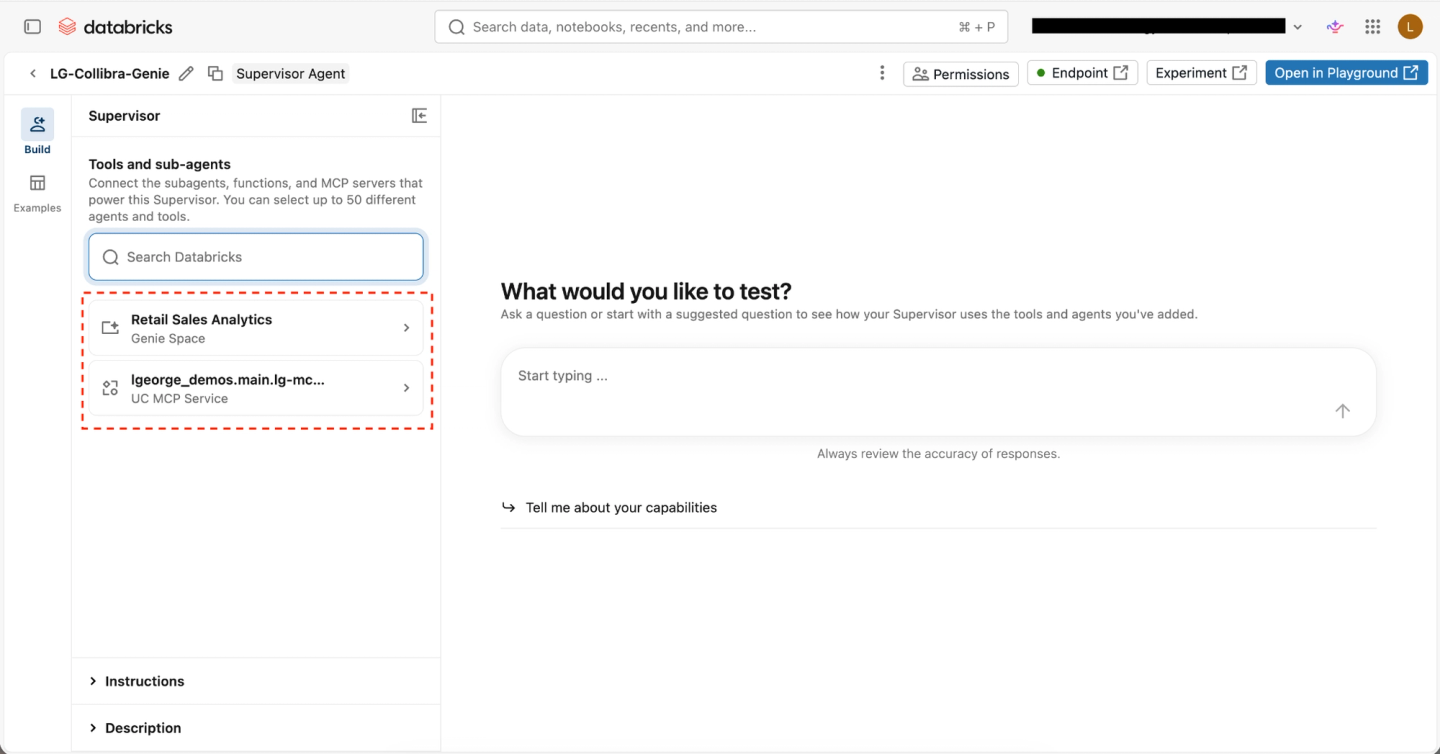
In the Multi-Agent Supervisor UI of Agent Bricks, you can add many different tools, ranging from Genie Agents to UC functions. In our case, we’ll add our Genie Agent and our Collibra MCP server.
To make the agent perform better, while optional, we recommend adding some instructions. Here’s a simple starting point:
- Use the Collibra UC MCP connection to look up any term or definition first.
- If a user asks a question that includes a specific term, metric or definition, resolve it in Collibra before doing anything else.
- If a question requires data to answer it, go to the attached Genie Agent.
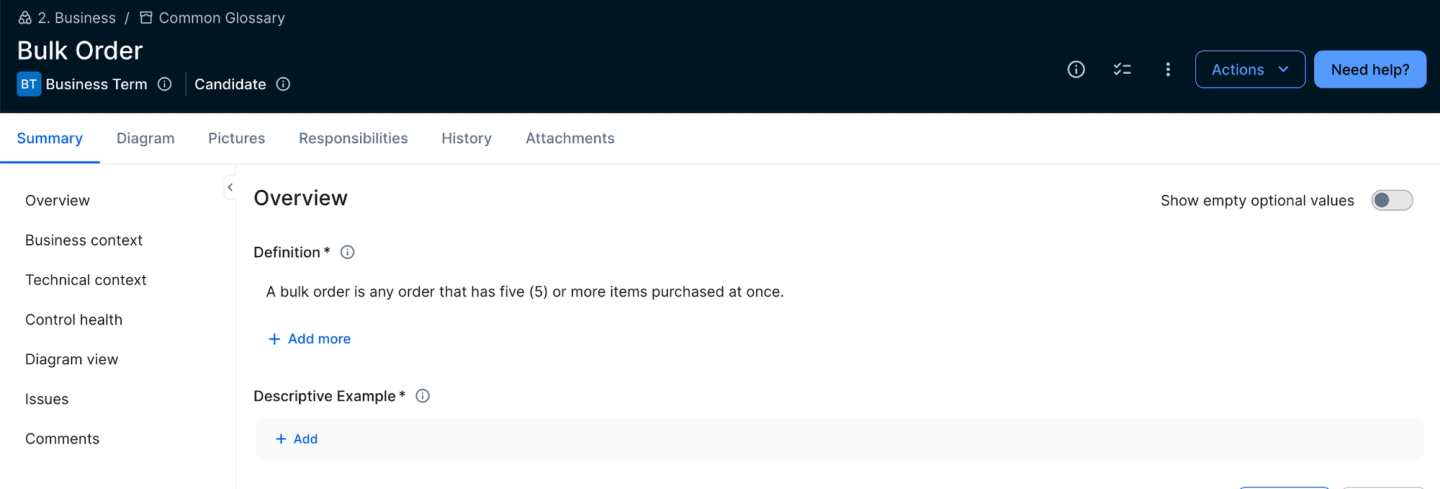
To test it in Playground, we asked the agent “How many transactions are considered bulk orders?" It’s important to note that nowhere in my Genie Agent or Unity Catalog metadata is the term “bulk order” defined anywhere, and we don’t want Genie to guess about any definitions. Instead, the Agent should reach out to Collibra and find the definition before going to Genie. Our “bulk order” business term is in our Collibra glossary, as shown below:
Now, when our Agent goes to answer our question, it consults the glossary first, instead of making up or guessing an answer.
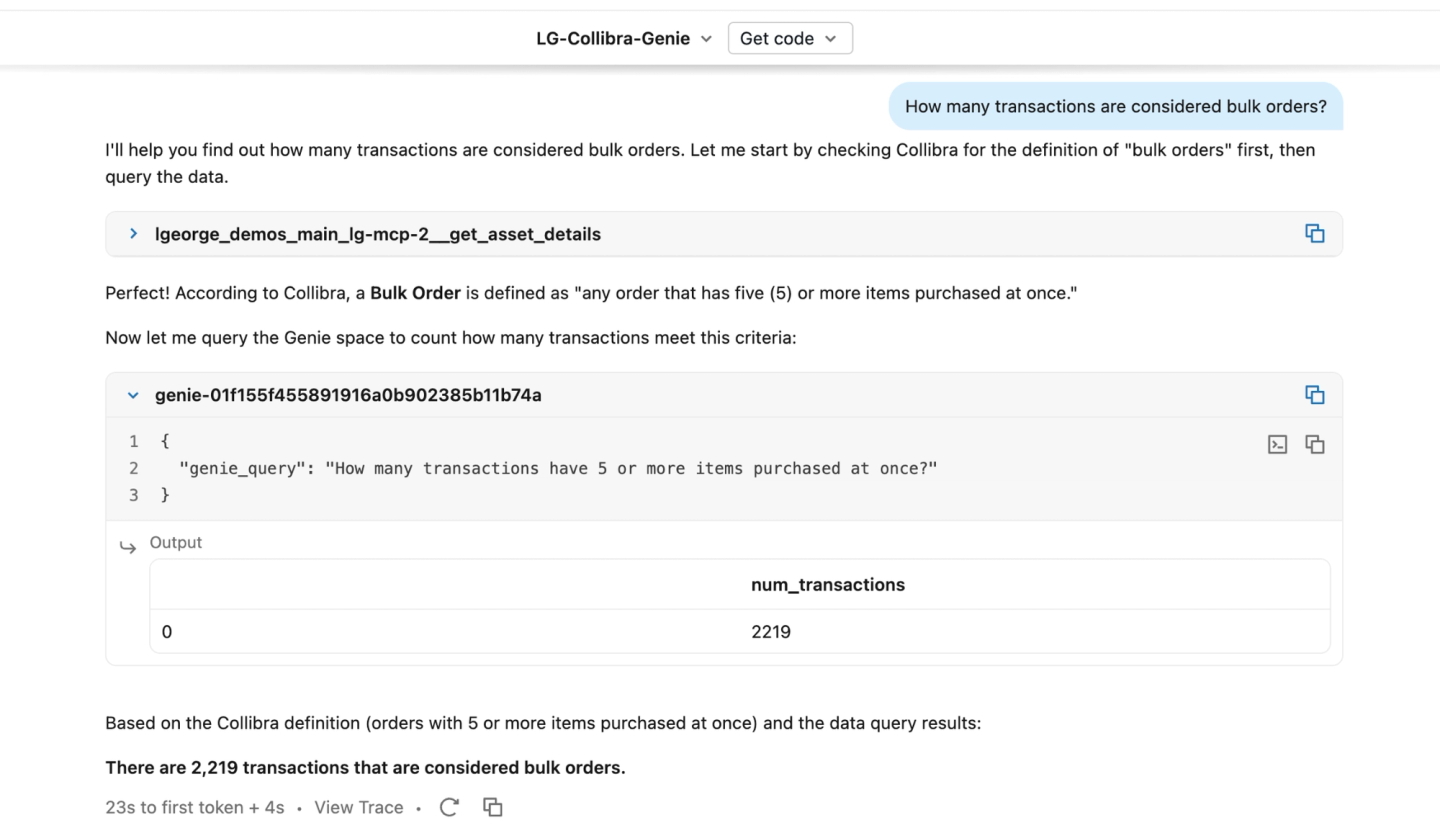
We could have defined “bulk order” in the Genie Agent configuration, but that method doesn’t scale. Retrieving it from Collibra ensures every AI agent, Genie Agent, Databricks user, and non-Databricks user operate on the same definition and metrics, greatly reducing the risk of two users in the same organization operating on different definitions.
Use case two: Data contract validation
While data contracts in software engineering have been around since the 1980s, data contracts in the data engineering and analytics space are much newer, emerging around 2022.
The concept may seem daunting; in practice, however, it’s essentially an agreement (or contract) between a data producer and data consumer about what the data should look like: its schema, refresh frequency, ownership, etc. Data contracts may be informal, like a simple handshake that the upstream data team won’t suddenly rename columns. However, a better strategy is to leverage a formal data contract strategy, usually in the form of a manifest file in YAML or JSON.
While manifest files are great for ensuring communications and understanding between data consumers and data producers, they can create a new challenge: Sometimes it can be difficult for data producers (often data engineers) to confirm their changes still align with the requirements set out by the data contract. This represents the second use case for the Collibra MCP server.
Whenever a data pipeline finishes running (assuming batch processing), or changes are made to a table in Databricks, a user can run a simple check through the Collibra MCP server to see if the table still matches the requirements defined in Collibra.
In Collibra, we have a data contract for a data product whose output is a single table. The Collibra UI shows every detail of that data contract, including the schema that the output table must follow.
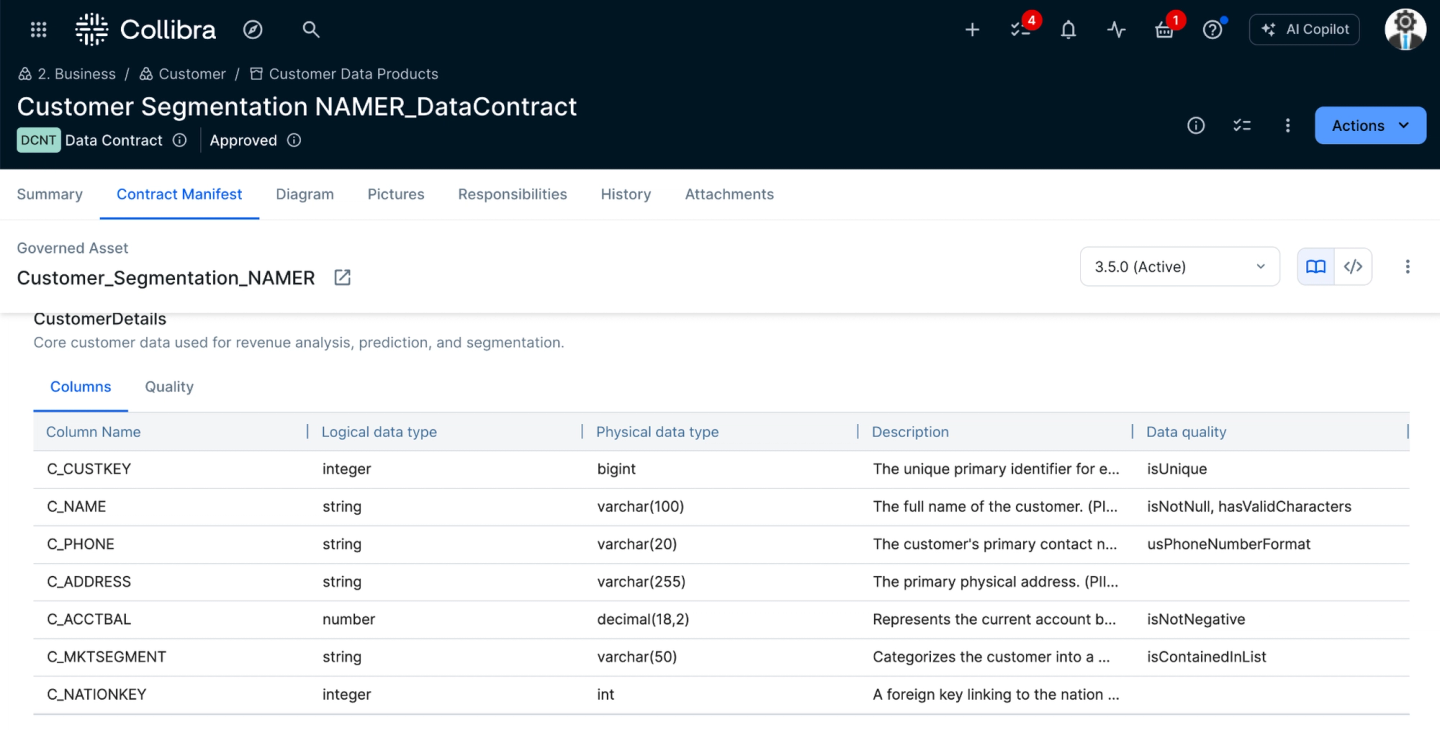
A data producer can easily open the Collibra UI and view this information, but manually comparing the data contract to the table inside of Databricks is tedious and error-prone. This is where the MCP can come in handy; it evaluates the table in Databricks directly and reports whether it meets the requirements specified in the data contract.
You can ask an Agent in Databricks a question like “Does my table customer_segmentation meet the Customer Segmentation NAMER_DataContract?” and you’ll get results like the one below:
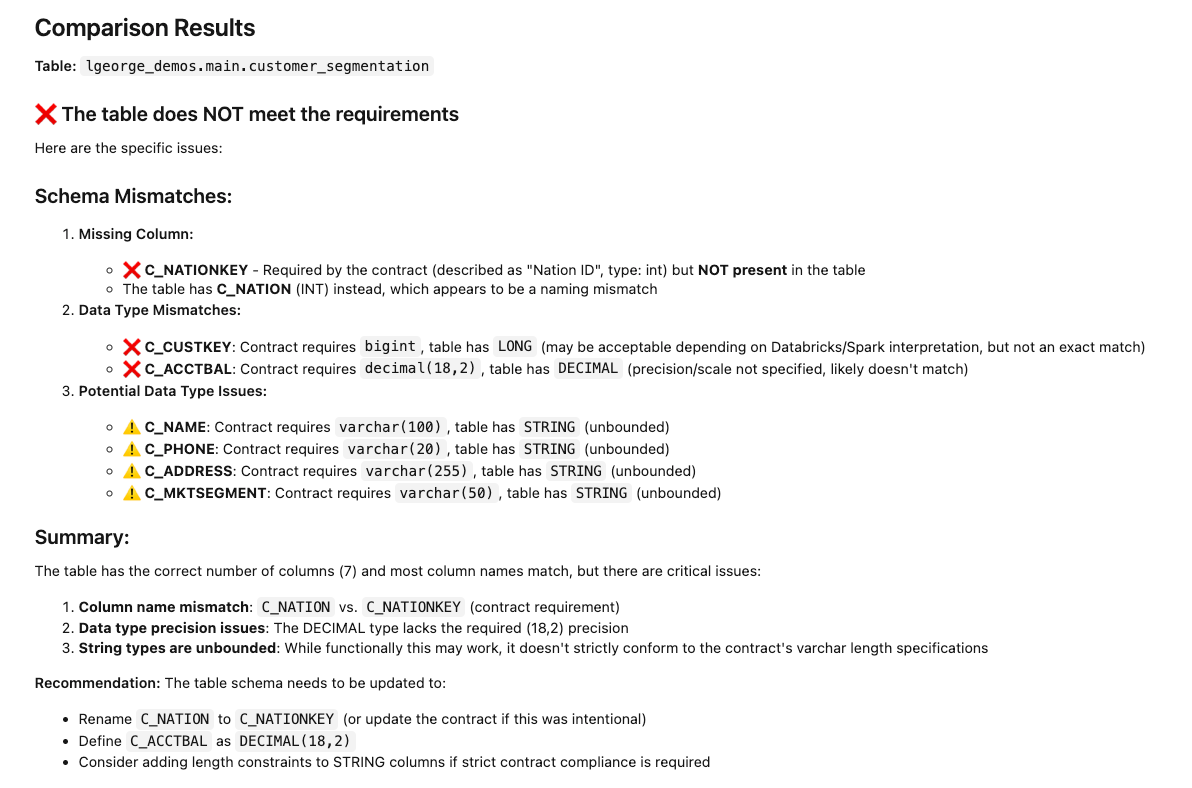
In this scenario, we again used Databricks’ Multi-Agent Supervisor because it’s easy to use and good for lightweight testing. However, in production, you could incorporate this into data pipelines, automated checks and more. And schema is only the start. You could just as easily ask about freshness SLAs (when was the table last updated?), null-value thresholds, and other contract terms.
With Collibra MCP Server, contract validation becomes something a data producer (whether they’re a data engineer, data scientist, software engineer, or any other user) can run in seconds, catching a breach before it happens. That saves time and reduces the risk of a downstream outage caused by a data contract breach.
Use case three: Creating assets in Collibra
The first two use cases focus on retrieving governed context from Collibra, a business term, then a contract’s requirements. In many environments you won’t need to: Collibra Edge automatically catalogs new Databricks assets, including newly created tables, views, volumes or other assets. So manually creating a table in Collibra via the MCP server would be redundant and isn’t a best practice, since Edge will create it automatically.
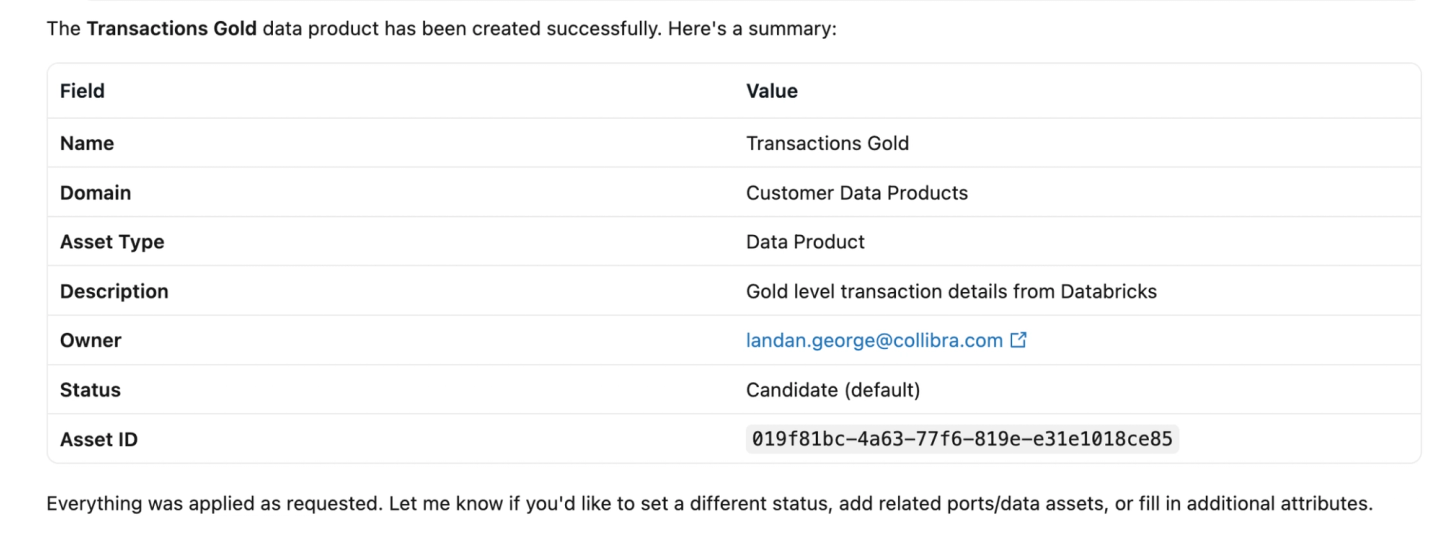
Where creation does make sense is a case where a user wants to create an asset on newly created gold-level data in Unity Catalog. You could build that data product inside Collibra. But if you’re already developing inside of Databricks, this method could be faster and more efficient. Below, we’ll create a new data product in Collibra based on a transactions table in Unity Catalog.

The output confirms the new data product, along with the attributes we specified.
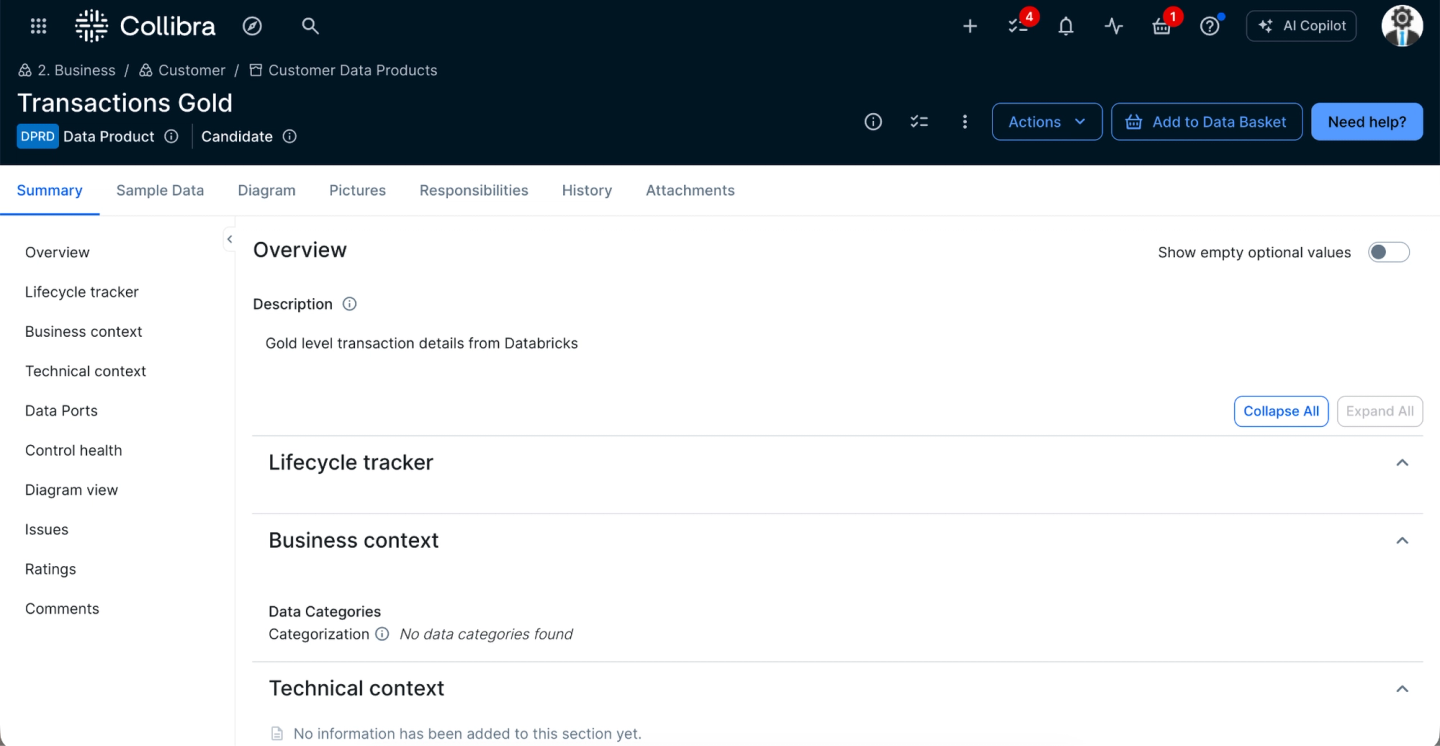
We can also verify the data product exists in the Collibra UI, with the name, description and other metadata we provided.
In addition to creating assets, we can also update existing assets, for example, adding a user as a data steward.
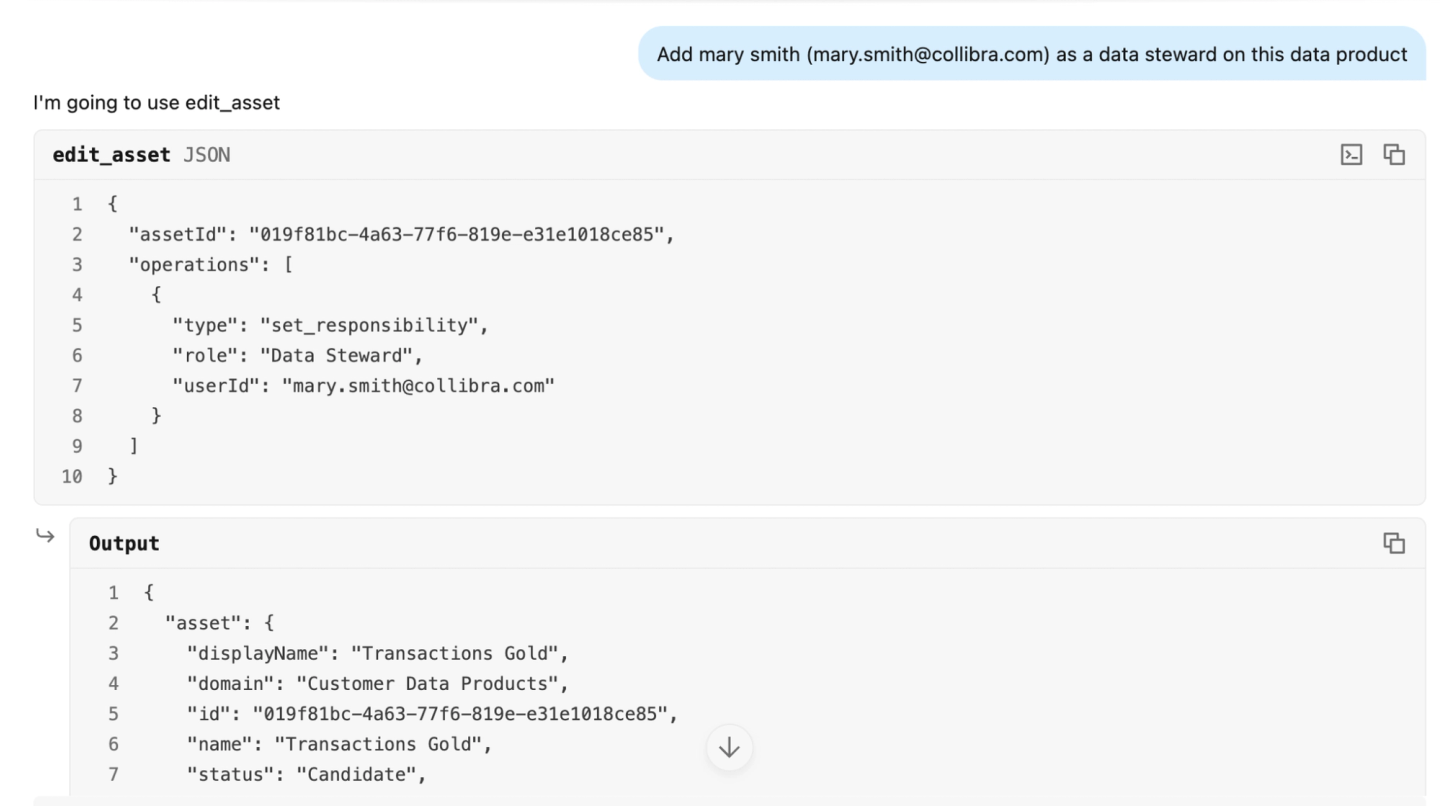
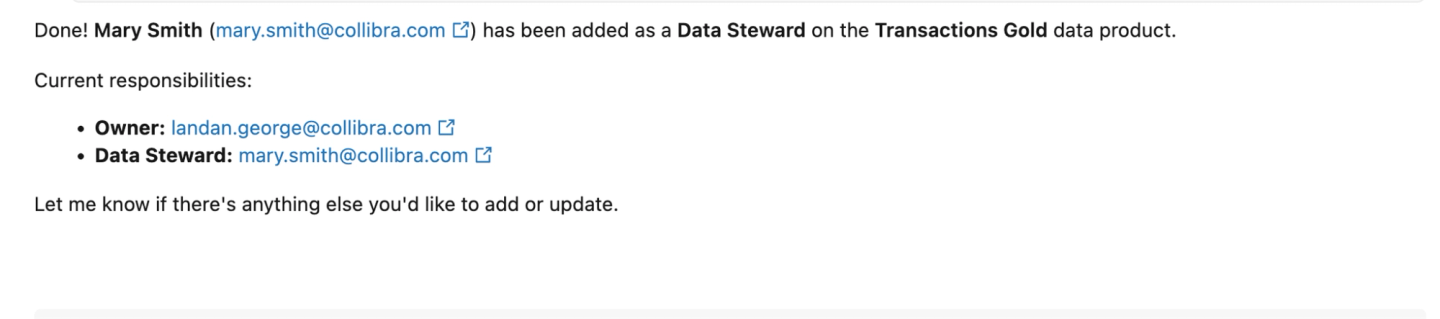
Being able to create and modify Collibra assets from Databricks lets data engineers, data scientists and other users work more productively: less context switching, using natural language, and the option to automate the whole thing, which makes the data and AI governance process more efficient.
Scale your data and AI initiatives with Collibra MCP server and Databricks
The Collibra MCP server changes the shape of data and AI governance on Databricks by bridging the gap between technical execution and business oversight.
By leveraging this integration, organizations can unify their data definitions, automate data contract validation and streamline asset management, all without leaving the Databricks environment. These capabilities not only reduce context switching and improve productivity for data teams, but also ensure that consistent, governed data is the standard across the entire enterprise. This is what production-grade agentic AI requires: agents grounded in verified business context, with traceable answers people can trust.
As organizations continue to scale their data and AI initiatives, running Databricks and Collibra together provides a robust, scalable foundation for trust and clarity.
Learn how to connect Collibra MCP server to Databricks

Landan George
Landan George
Senior Customer Engineer
Collibra
Share on:
Keep up with the latest from Collibra
I would like to get updates about the latest Collibra content, events and more.
Thanks for signing up
You'll begin receiving educational materials and invitations to network with our community soon.