










Governed AI at the speed of Snowflake: How Collibra MCP powers Snowflake CoWork & Cortex CoCo
Share on:



Your AI agents are only as trustworthy as the data and context they operate on. When your most authoritative business definitions, data lineage maps, classification policies, and data contracts live in a governed catalog, getting that context into an AI workflow in real time and with proper access controls has traditionally required custom engineering. Collibra's Model Context Protocol (MCP) server changes that equation entirely. And when paired with Snowflake Cortex CoCo and Cowork, it turns your data catalog into an always-on, agent-ready intelligence layer.
What Is Collibra MCP?
MCP is an open standard that gives AI assistants and agents a live, structured connection to enterprise systems. It functions like an API layer purpose-built for AI applications. Instead of relying on stale exports or bespoke point-to-point integrations, an agent using MCP can query exactly the context it needs, at the moment it needs it.
The Collibra MCP server connects your AI assistant to governed metadata and business context in Collibra. Through it, an assistant can discover data assets, explore lineage, search your business glossary, and more, using current context from Collibra.
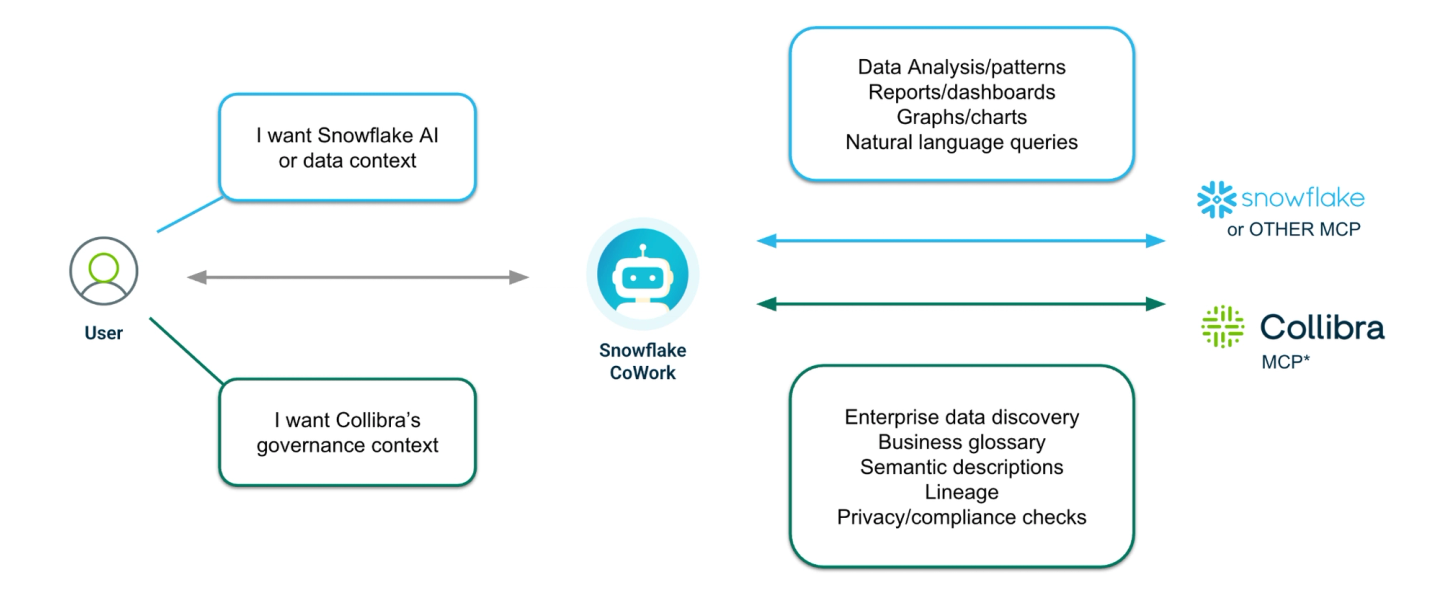
The server uses streamable HTTP for transport and OAuth for authentication, making it both performant and enterprise-secure. Critically, because tools are discovered dynamically, new tools become available without any change on your side, providing your Cortex Agents new capabilities the moment Collibra publishes them.
The Collibra MCP server exposes tools in three categories:
- Read tools that return data from Collibra without making changes
- Write tools that create or modify data in Collibra
- Experimental tools that are opt-in and off by default
Connecting Snowflake Cortex to Collibra MCP
Snowflake Cortex connects to the Collibra MCP server through a standard MCP connector. Once connected, Cortex Agents can use Collibra's governed metadata tools. The recommended approach is for an ACCOUNTADMIN role to create the connector once and share it with selected user groups who then authenticate using oAuth to ensure that each request is done using their existing roles in Collibra.
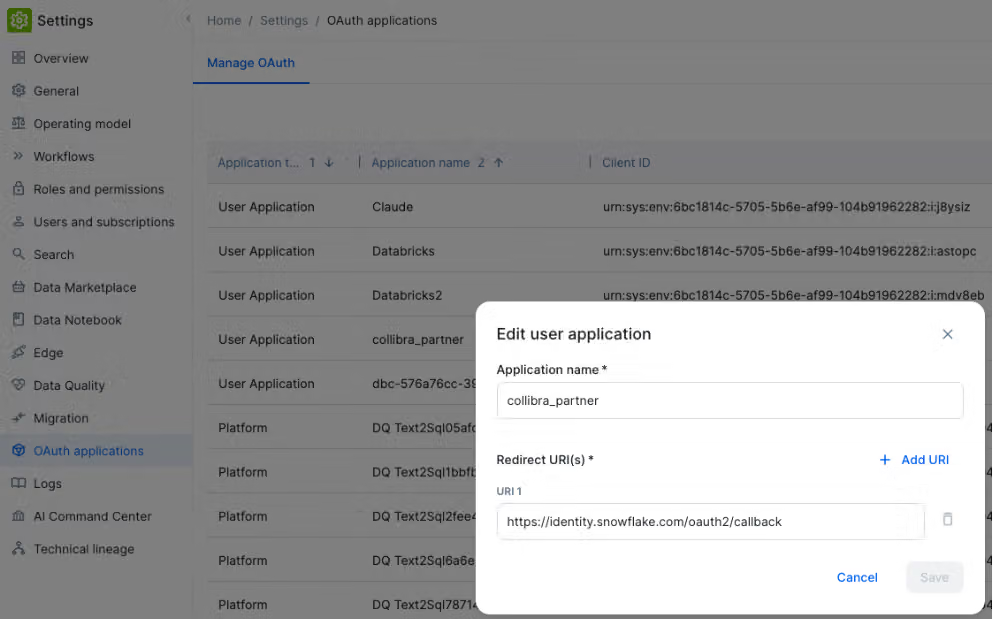
Step 1: Register an OAuth Application in Collibra
In Collibra, go to Settings → OAuth Applications and click Register user application. You need two values:
- Redirect URI: https://identity.snowflake.com/oauth2/callback
After registering, copy the Client ID and Client Secret for the next step.
Step 2: Add a Custom MCP Connector in Snowflake
In Snowflake Snowsight, navigate to Settings → Account → MCP Connectors → Add Custom and complete the form(only a user with ACCOUNTADMIN privileges can add the MCP Connector):'
Field | Value |
|---|---|
API Integration | Standard OAuth |
Server URL | https://<instance>.collibra.com/rest/mcp |
Token Endpoint | https://<instance>.collibra.com/rest/oauth/v2/token |
Authorization Endpoint | https://<instance>.collibra.com/rest/oauth/v2/authorize |
OAuth Client ID | From Step 1 |
OAuth Client Secret | From Step 1 |
Scopes | Leave empty (or offline_access) |
| No sessions matching your filters are available. | |
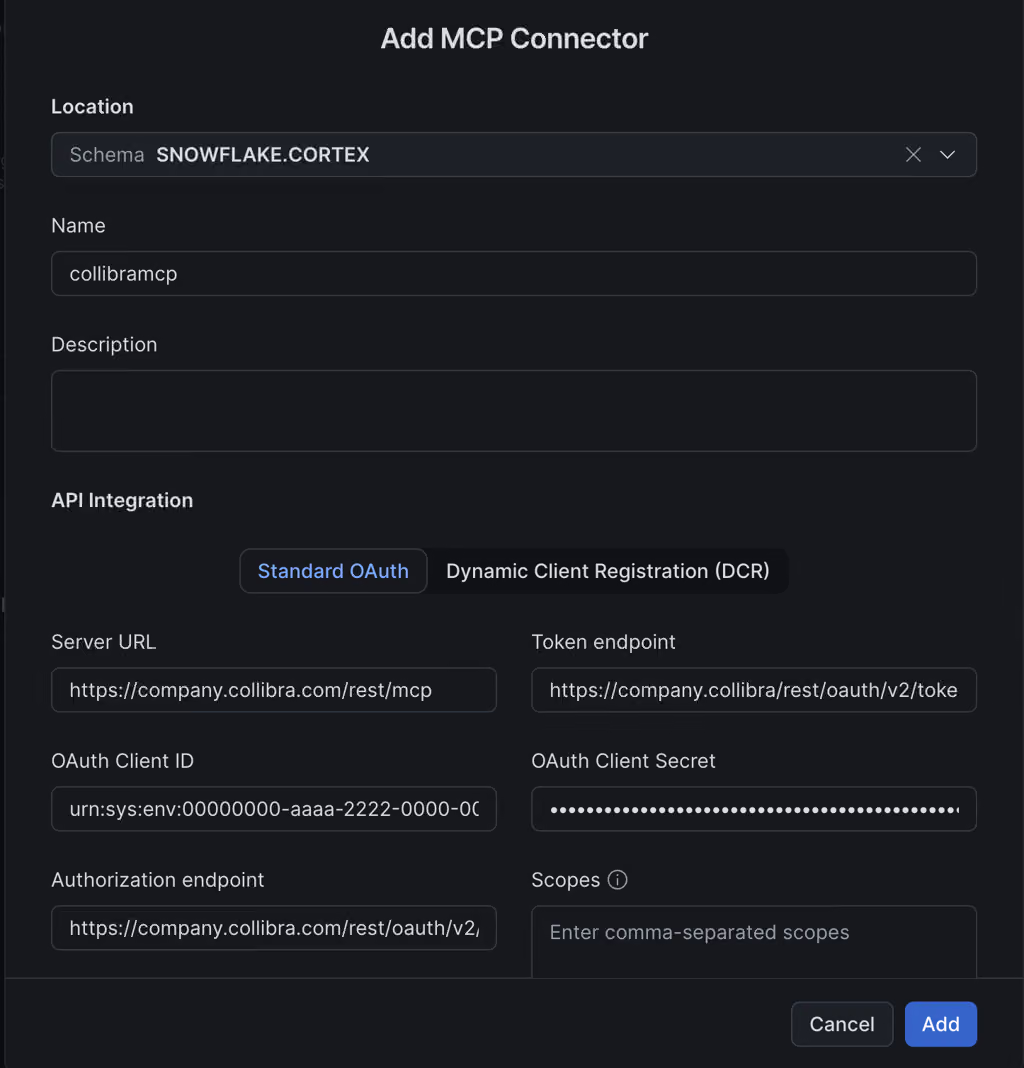
Click Add. Each user authenticates with their own Collibra credentials. Once the connection shows as Connected, Cortex Agents can access all available Collibra tools.
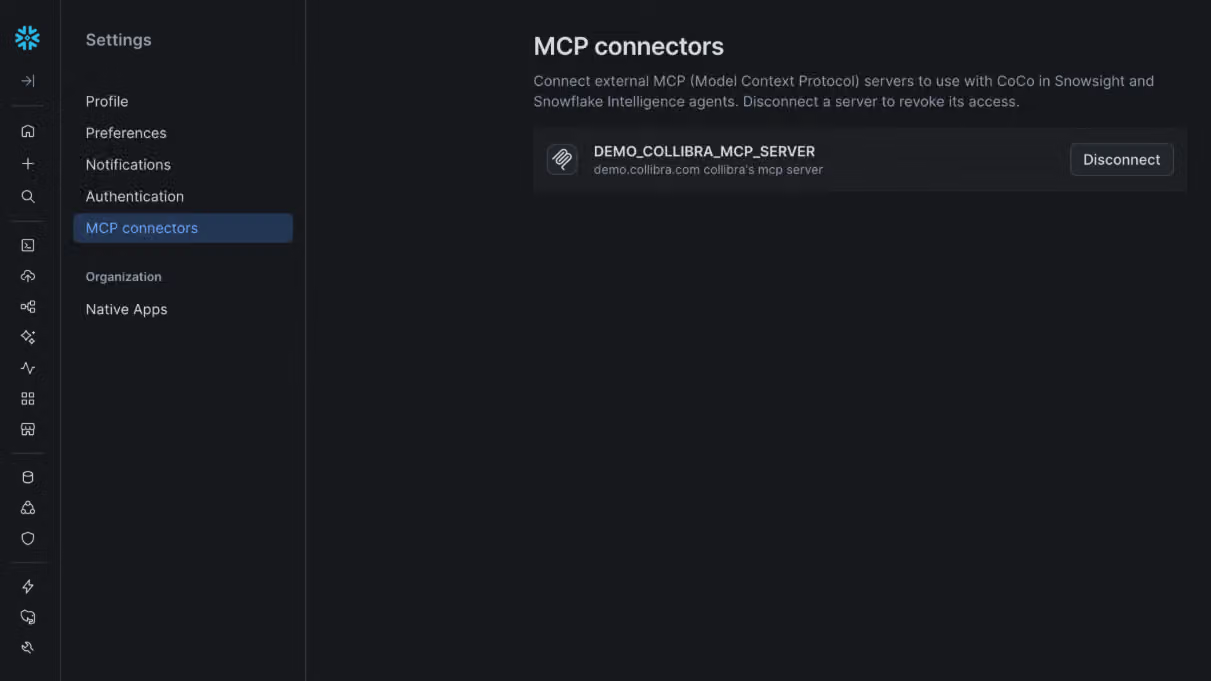
For more details on Snowflake Collibra MCP Integrations, visit the Collibra product documentation.
Security by design: Per-user OAuth identity
The integration's security model deserves a closer look. Each user signs in with their own Collibra credentials (OAuth 2.0).
This means every API call from a Cortex Agent carries the authenticated user's identity. Collibra's full role-based access controls apply, meaning a user who lacks permission to see a sensitive asset in Collibra cannot access it through the agent either. The result is an AI workflow that is audit-ready from day one, with no separate identity governance layer to bolt on afterward.
The MCP tool palette
Before diving into use cases, it helps to understand what Cortex Agents can actually do through the Collibra MCP connection. The tools span the full data governance lifecycle:
Discovery and search: discover_data_assets and discover_business_glossary let agents answer natural-language questions about what data exists and what business terms mean. search_asset_keyword, search_data_class, and search_data_classification_match offer targeted lookup across the catalog.
Semantic understanding: get_table_semantics and get_column_semantics expose the full semantic layer for any table or column, including connected measures, data attributes and business assets, letting agents understand not just structure but meaning. get_business_term_data traces a business term all the way back to the physical tables and columns that realize it.
Lineage: get_lineage_upstream, get_lineage_downstream, get_lineage_transformation, and get_lineage_entity give agents complete traceability: where data came from, what transformed it and where it flows next.
Data contracts: list_data_contract, pull_data_contract_manifest, init_data_contract, and push_data_contract_manifest let agents surface and manage the formal agreements governing data products.
Classification and curation: add_data_classification_match and remove_data_classification_match let agents apply or remove data class associations. create_asset and edit_asset let agents create new catalog entries and update attributes, responsibilities, tags and relations.
This is a rich toolkit. The use cases below show how these tools chain together into real, end-to-end workflows. For more information on available MCP tools, visit the Collibra Product documentation.
Use Case 1: Financial Services — BCBS 239 regulatory capital reporting
Persona: A quantitative risk analyst at a global investment bank, working in Snowflake CoCo to build and validate capital models for regulatory submission.
The challenge: Regulatory reporting under BCBS 239 requires that every input dataset used in a capital calculation be traceable to a certified, approved source. Analysts frequently work with dozens of tables across multiple schemas. Knowing whether a given table is the authoritative version versus a staging copy, a data engineering draft or a deprecated feed, typically requires searching Collibra separately, filing a request to a data steward, and waiting. Under reporting deadlines, that friction creates real compliance risk.
The workflow with Collibra MCP:
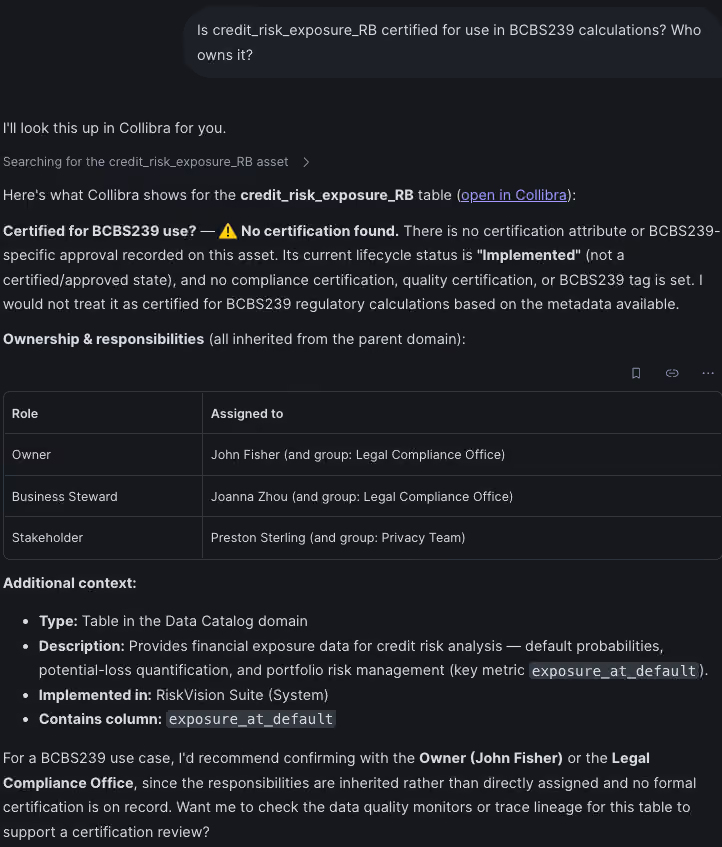
The analyst is building a credit exposure aggregation model in Snowflake Cortex Coco. Before joining against a key counterparty table, they prompt their Cortex Agent:
Is credit_risk_exposure_RB certified for use in BCBS 239 calculations? Who owns it?
The agent invokes discover_data_assets to locate the table in the Collibra catalog, then calls get_asset_details to retrieve its certification status, data steward and attributes. The analyst proceeds with confidence.
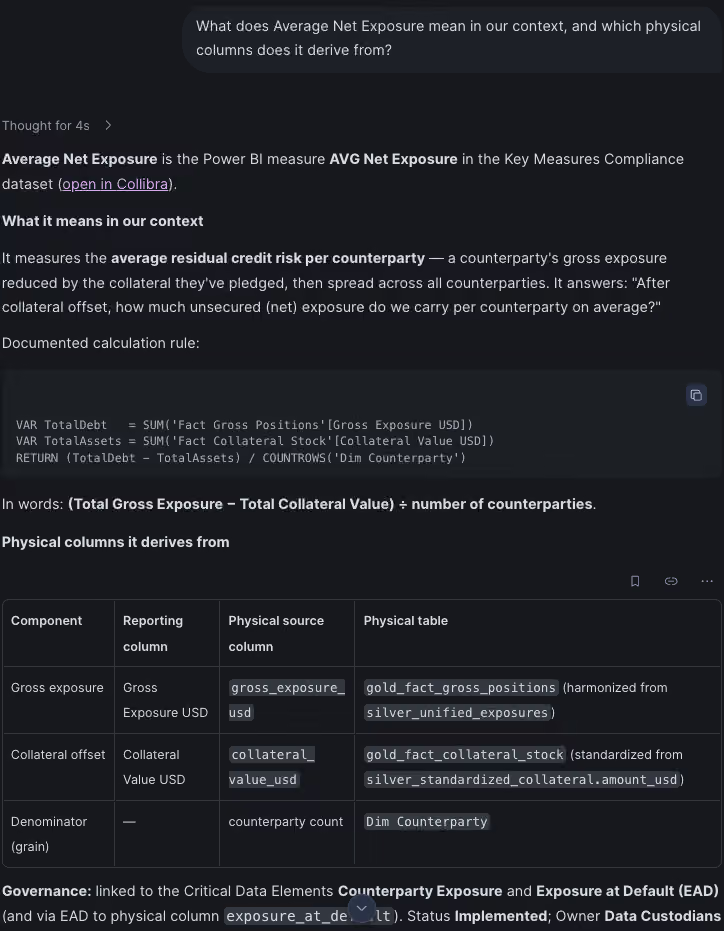
Next, the model requires an Average Net Exposure measure. The analyst asks:
What does Average Net Exposure mean in our context, and which physical columns does it derive from?
The agent calls discover_business_glossary to retrieve the canonical definition from the business glossary, then uses get_measure_data to trace the measure to its underlying physical columns and tables. It surfaces that the measure is derived from several source columns.
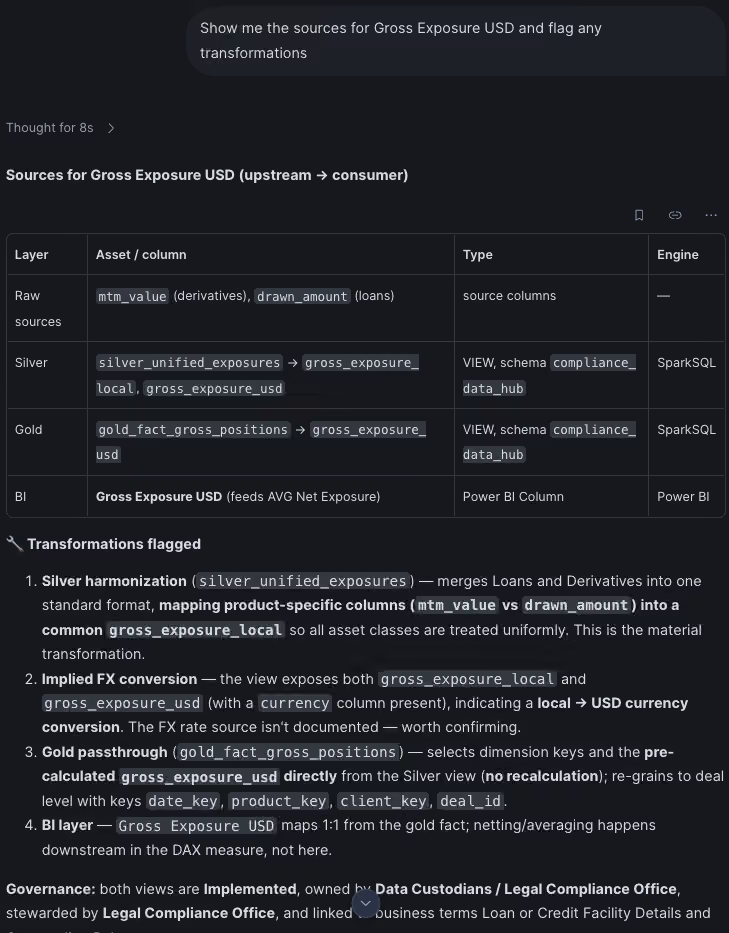
Before finalizing the model, the analyst wants to understand the full data lineage of the primary input table:
Show me the sources for Gross Exposure USD and flag any transformations
The agent calls get_lineage_upstream to walk the lineage graph and get_lineage_transformation to retrieve the transformation logic at each hop. The analyst captures this lineage reference in their model documentation.
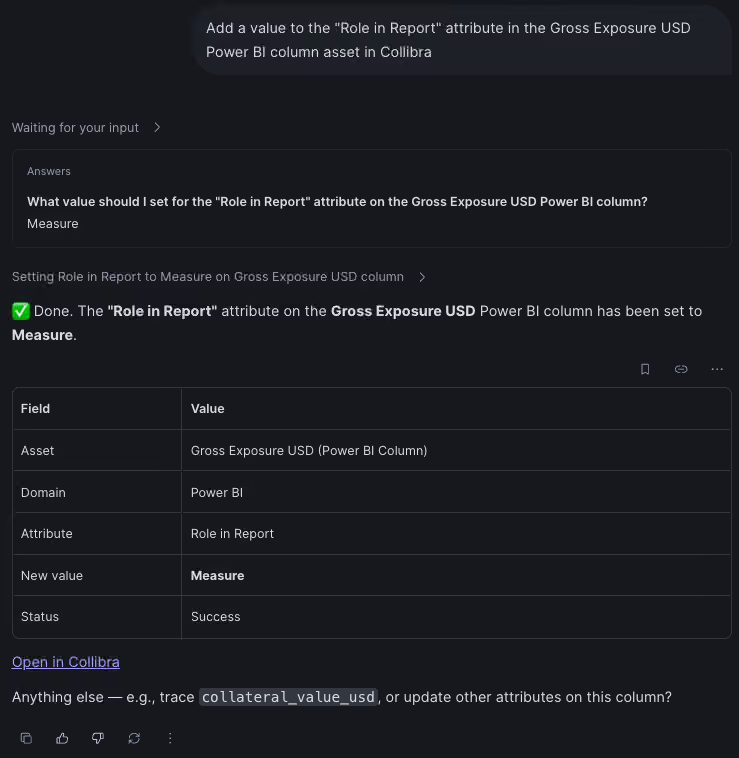
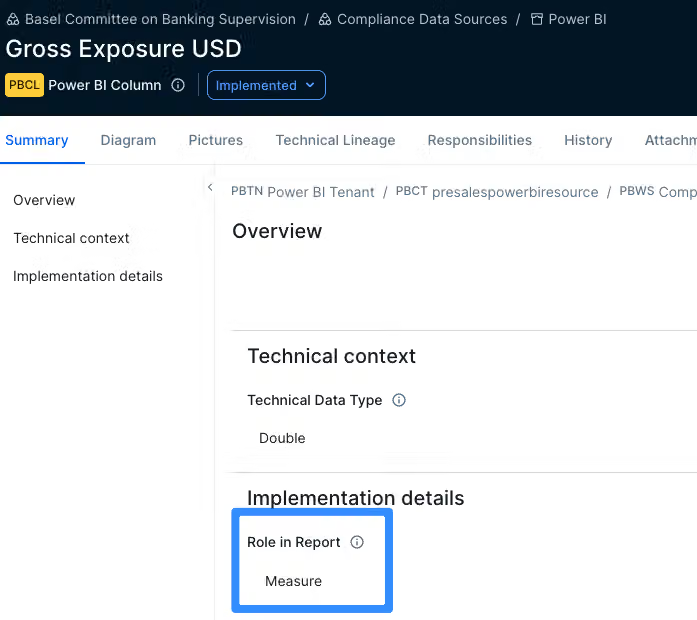
Finally, the analyst discovers that the column has not been marked with an appropriate role in the report. They ask the agent to register it:
Add a value to the "Role in Report" attribute in the Gross Exposure USD Power BI column asset in Collibra
The agent uses edit_asset to assign the column’s role in the report. The catalog is updated without leaving the Snowflake environment.
Impact: The analyst completes a fully governed, lineage-traced capital model without switching tools. Every dataset used is certified and traceable; every new asset is classified and stewarded. The resulting submission carries a complete audit trail — precisely what regulators require.
Why this integration matters
The combination of Collibra MCP, Snowflake CoWork and Snowflake CoCo represents a shift in where data governance lives. Instead of being a separate discipline that happens before or after analytical work, it becomes an ambient, real-time layer that Cortex Agents consult and update as work happens. Now, a large swath of users who would otherwise not work closely with the governance team, are now able to get immediate answers in natural language without having to leave where they work on a day to day basis.
Three properties make this durable:
Interoperability without lock-in. MCP is an open standard. The same Collibra MCP server that connects to Snowflake Cortex connects to Claude, Databricks and any other MCP-compatible AI platform with no re-implementation required.
Runtime tool discovery. New Collibra tools become available to agents the moment they're published. No connector updates, no version negotiation.
Governance that scales with AI. Because Collibra's access controls propagate per-user through OAuth, the governance posture your organization has invested in doesn't weaken when AI agents enter the picture, it extends with them.
Also, traditionally, Collibra has been the domain of business users seeking governance context. With MCP capabilities, this paradigm shifts significantly: technical users and data engineers operating within the Snowflake environment can now utilize natural language queries to interact directly with Collibra. This removes the barrier of needing to learn a new tool, empowering these technical roles to generate actionable insights and expedite governance and control decisions in the flow of their daily work.
Getting Started
The Collibra MCP server is free to use. The Snowflake connector setup takes an administrator minutes, and every user is live with a single OAuth sign-in.
For full configuration details and the complete tool reference:
- About Collibra's MCP server
- Connect Snowflake to the Collibra MCP
- Collibra MCP Tools Reference
- MCP on Snowflake

Anand Akella
Anand Akella
Senior Partnership Account Manager
Collibra

Jonathan Capo
Jonathan Capo
Customer Engineering Specialist
Collibra
Share on:
Keep up with the latest from Collibra
I would like to get updates about the latest Collibra content, events and more.
Thanks for signing up
You'll begin receiving educational materials and invitations to network with our community soon.