














Bring your own continuous deployment: Run Collibra Edge upgrades your way
Share on:


Platform teams have standardized how software reaches production, and GitOps is now how many of them do it. The CNCF's 2025 Argo CD End User Survey found Argo CD running in nearly 60% of respondents' Kubernetes clusters for application delivery, and in Octopus Deploy's State of GitOps research, 81% of respondents agreed GitOps improves auditability. When one application upgrades itself outside that pipeline, it becomes the exception every change board has to argue about. Bring your own continuous deployment (BYOCD) removes that exception for Collibra Edge.
What's new: Bring your own continuous deployment (BYOCD)
Bring your own continuous deployment (BYOCD) lets you deploy and upgrade Collibra Edge sites through the continuous deployment tool your organization already uses, such as Argo CD, instead of relying on Edge to manage its own upgrades.
Collibra Edge is packaged as a standard Helm chart. With BYOCD, your CD tool installs that chart and keeps it in sync with the configuration stored in your Git repository. Upgrades happen when you change the chart version in Git, follow your existing approval and promotion process, and roll out on your schedule. Collibra's built-in upgrade path remains available for teams that prefer it. You choose per site whether upgrades are managed by Collibra or by your own pipeline.
Because Edge no longer needs to upgrade itself when BYOCD is enabled, the Kubernetes permissions required to run an Edge site are reduced. That makes it easier to get Edge approved in security-conscious environments and to keep it there.
How BYOCD helps
For many enterprises, Collibra Edge was the one workload in the cluster that didn't follow the rules. Every other application is defined in Git, promoted from development to test to production, and deployed by a single CD tool that the platform team owns. Edge, by contrast, upgraded itself, either automatically or when triggered from Collibra, using a component that needed broad, namespace-level permissions to do it. Platform teams couldn't guarantee that the same resources were running in every environment, change management teams couldn't fit Edge upgrades into their approval process, and security teams pushed back on the permissions. BYOCD brings Edge in line with how the rest of the cluster already works.
Problems it solves
Left unaddressed, that mismatch shows up in a few consistent ways:
- Edge upgrades that happen outside the organization's change management process, creating audit and compliance friction
- No reliable way to guarantee that identical Edge resources run in development, test and production
- Elevated Kubernetes permissions that security teams are reluctant to grant to a self-upgrading component
- Platform teams managing Edge separately from every other application, with a separate process, separate tooling and separate visibility
- Installation delays when Edge can't be deployed according to internal IT standards, slowing time to value for data governance programs
How BYOCD works
Collibra Edge runs in your Kubernetes cluster and is delivered as a Helm chart. Without BYOCD, an Edge deployment component installs and upgrades that chart for you. With BYOCD, your CD tool takes over that job. You point your tool at the Collibra Edge Helm chart, either directly from Collibra's repository or from a mirror in your own registry, and supply your site's values: the site ID, your Collibra platform URL, your image registry and the chart version you want to run. A single setting in your values file tells Edge that upgrades are managed externally.
COLLIBRA_URL # your Collibra platform URL, e.g. https://my-org.collibra.com/
EDGE_SITE_ID # site UUID
TARGET_EDGE_VERSION # version to install, e.g. 2026.10.0-main.10922
EDGE_NAMESPACE # namespace to install into
DOCKER_REGISTRY_HOST # registry holding the edge images
DOCKER_REGISTRY_USER
DOCKER_REGISTRY_PASS
HELM_CHART # chart repo URL, e.g. https://repository.collibra.io/artifactory/edge-helm-gold
HELM_REGISTRY_USER
HELM_REGISTRY_PASS
EDGE_CLIENT_ID # OAuth client issued for this site
EDGE_CLIENT_SECRET
Here's a simplified example of an Argo CD Application for an Edge site:
kubectl apply -n argocd -f - <<EOF
apiVersion: argoproj.io/v1alpha1
kind: Application
metadata:
name: collibra-edge
namespace: argocd
finalizers:
- resources-finalizer.argocd.argoproj.io
spec:
project: default
source:
repoURL: ${HELM_CHART}
chart: collibra-edge
targetRevision: ${TARGET_EDGE_VERSION}
helm:
valuesObject:
global:
siteId: ${EDGE_SITE_ID}
collibra:
imageRegistry: ${DOCKER_REGISTRY_HOST}
imagePullSecret: edge-repositories
priorityClassName:
omit: true
destination:
server: https://kubernetes.default.svc
namespace: ${EDGE_NAMESPACE}
syncPolicy:
automated:
prune: true
selfHeal: true
EOF
Because the configuration lives in Git, you can parameterize it per environment and promote it the same way you promote any other workload: a pull request moves a chart version from development to test to production, and your CD tool keeps each cluster in sync with what's in the repository. Secrets such as Collibra authentication and registry credentials are created through your own secret management approach rather than through the Edge installer.
Once the site is deployed, it appears in Collibra's Edge settings with its upgrade mode set to External, so administrators can see at a glance which sites are managed by a customer pipeline. To upgrade, you change the target chart version in Git. Your CD tool rolls out the new version, the site briefly reports as unhealthy while pods restart, and it returns to healthy once the upgrade completes. Upgrades for that site can no longer be triggered from the Edge UI, so your pipeline remains the single source of truth.
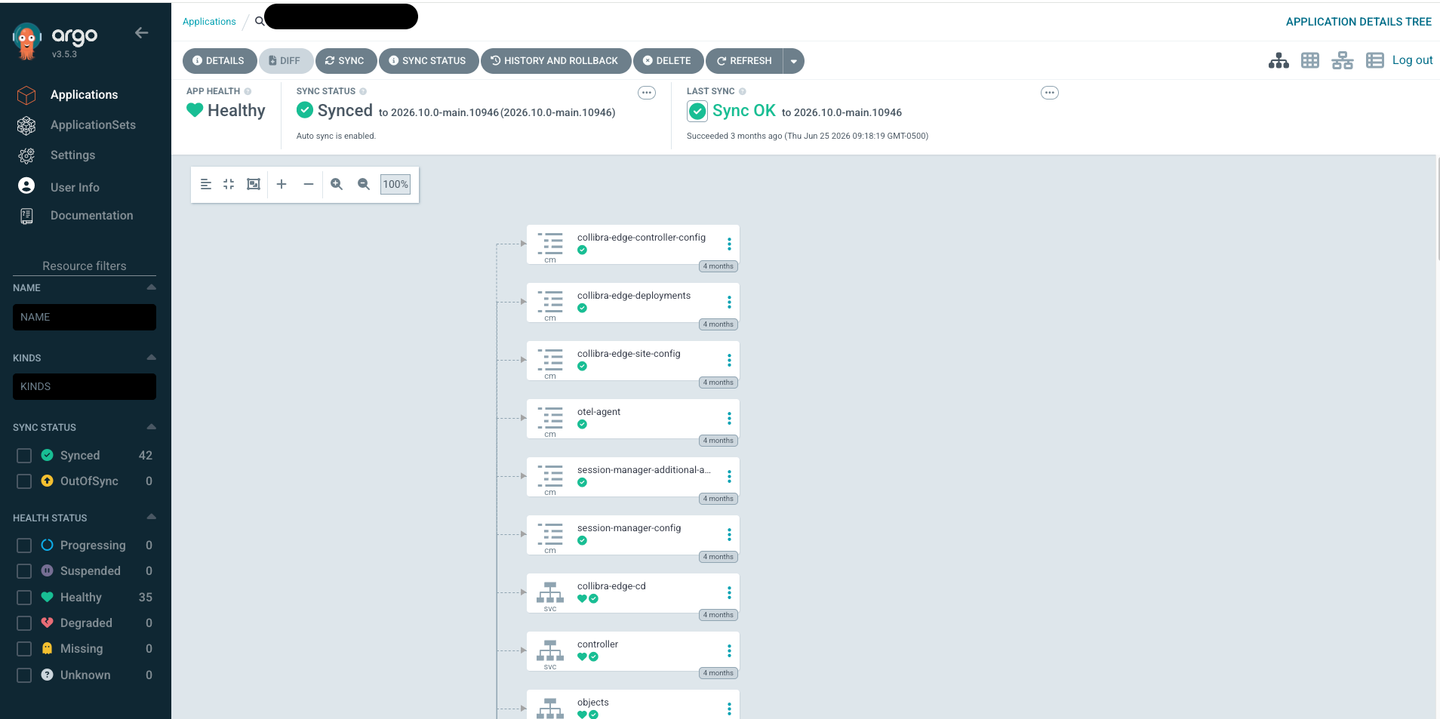
A Collibra Edge site deployed and synced through Argo CD, showing the collibra-edge Helm chart, its pinned target revision, and a healthy sync status.

The Edge site in Collibra's Edge settings, displaying an upgrade mode of External to indicate that upgrades are managed by the customer's own continuous deployment tool.
BYOCD also tightens Edge's security footprint. The component that previously needed namespace-admin-level access to modify its own Helm release no longer requires those rights when upgrades are managed externally, and those permissions are removed from the list required to run an Edge site.
One best practice to keep in mind: pin specific chart versions rather than configuring your CD tool to always track the latest chart. Pinning ensures you never upgrade Edge beyond the version your Collibra environment supports.
Why you should be excited
- Platform and DevOps engineers: Manage Edge exactly like every other workload in the cluster, defined in Git, deployed by the same CD tool and promoted through the same environments, with no separate upgrade process to learn or maintain.
- Security and IT risk teams: Approve Edge with fewer Kubernetes permissions, since Edge no longer needs elevated rights to upgrade itself, and keep a full audit trail of every change in version control.
- Change and release managers: Bring Edge upgrades into the existing change approval process, so nothing reaches production without passing the same gates as every other application.
- Data governance and Edge administrators: Get Edge installed and approved faster in environments with strict IT standards, and see at a glance in Collibra which sites are managed externally.
Use cases
Regulated change control on a managed container platform
A European bank runs a managed container platform with every installation defined as Kubernetes resources in Git and promoted from development to acceptance to production through Argo CD. Its change process requires that no workload changes outside that pipeline. With BYOCD, the bank's platform team defines its Edge site in the same repository, parameterizes it per environment, and promotes new Edge versions through pull requests, giving auditors one consistent record of what changed, when and who approved it.
One deployment standard across hundreds of applications
A large retailer's platform team uses Argo CD to manage hundreds of applications across multiple clusters and doesn't make exceptions for individual vendors. Rather than maintaining a separate upgrade path for Edge, the team points Argo CD at a mirrored copy of the Edge Helm chart and images in its own registry, pins the version, and upgrades Edge alongside the rest of its quarterly platform updates.
Least-privilege deployment in the public sector
A state health agency must justify every permission granted to third-party software running in its environment. With upgrades managed externally, the agency deploys Edge without granting the elevated namespace-level permissions previously needed for self-upgrades, shortening its security review and getting governance capabilities connected to its data sources sooner.
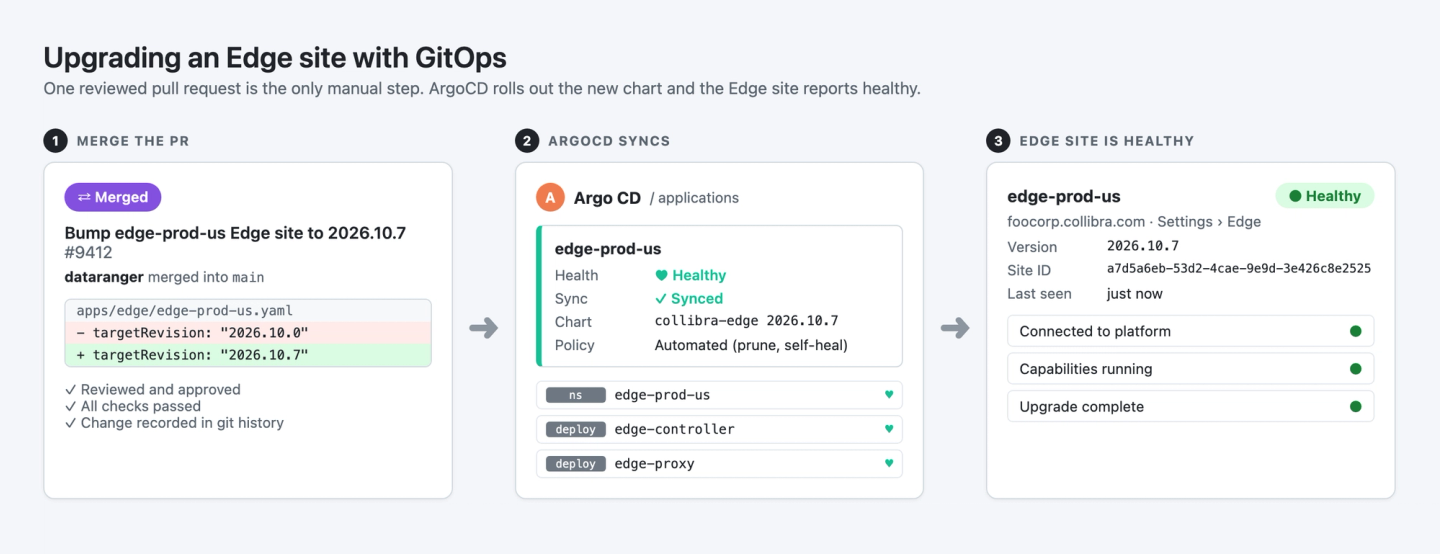
A Git pull request bumping the Collibra Edge chart version in a production values file, ready for approval through the team's standard change process.
Key takeaways about BYOCD
Edge now installs and upgrades through the same CD tool, Git repository and change process as every other application, with fewer permissions and full traceability. That's part of Collibra's broader commitment to an enterprise-grade platform that fits how large organizations already operate, rather than asking them to work around it. The result is faster approvals, consistent environments and Edge upgrades that happen on your terms.
- Collibra Edge can now be deployed and upgraded by your own continuous deployment tool, with configuration managed in Git and promoted across environments.
- Sites managed this way show an External upgrade mode in Collibra, and upgrades happen when you change the pinned chart version in your pipeline.
- Edge requires fewer Kubernetes permissions when upgrades are managed externally, simplifying security reviews.

Celene McFall
Celene McFall
Staff Product Manager
Collibra

Marcus Walz
Marcus Walz
Senior Software Engineer
Collibra

Michael Rahm
Michael Rahm
Director, Product Marketing
Collibra
Share on:
Keep up with the latest from Collibra
I would like to get updates about the latest Collibra content, events and more.
Thanks for signing up
You'll begin receiving educational materials and invitations to network with our community soon.